Type.ai vs ChatGPT at a glance
Both Type.ai and ChatGPT excel in different areas. The table below gives an at-a-glance reference to which tool handles particular tasks better. We’ve found that, generally, each tool breaks down like this:
Type.ai is better at any task related to writing. It stores your work better, more logically, and more safely. It makes it easier to navigate through long works, to pick out sections for improvements, and to make edits to those sections with or without AI assistance. It’s much better at keeping track of what style of writing you prefer and not “losing the thread” of what you are asking for mid-stream, which means less time spent forcing the tool back on track when it goes astray.
ChatGPT is much better if you are only planning on doing light writing work and want a general assistant built in that can help you with almost any other non-writing task. It’s an incredibly powerful general tool that’s also good at writing on a sentence-by-sentence or paragraph-by-paragraph level, and is only limited by its lack of specialization.
Since Type.ai includes ChatGPT as an available model, you don’t lose a bit of the power the frontier model offers. In paid models, premium models from OpenAI, Anthropic and Google are all available, harnessed to Type’s 150,000-word document support for $12 a month (or $8 a month, billed annually)
The choice is entirely about what work you want to do and how you want to approach it.
Note: This comparison was valid and up-to-date as of 8/31/2026. This is a fast-moving field of technology, so changes might come quicker than you’d think. It’s generally likely that in the short and mid-term, ChatGPT will remain the stronger multi-modal tool, and Type.ai will remain a more specialized writing environment.
The main difference is the writing process
Comparing Type.ai and ChatGPT for even a few moments makes the differences between both programs stark. It’s not like comparing, say, Claude with ChatGPT, where the primary takeaways have to do with slight differences in the way two AI models think and communicate. Instead, the difference between Type.ai and ChatGPT is much more about what it’s like to do work in the environment either tool provides.
Type.ai wins here because it’s built to handle persistent, long-form projects. You aren’t locked in on model choice (You can choose from a variety of latest-release AI models, depending on what you like), and you get to work with them in a custom-built ecosystem with every tool you might need. That makes the writing process fast and flexible in Type’s paid tiers - if ChatGPT isn’t delivering on a particular task, you can switch to Claude or Gemini with zero friction.
Using just ChatGPT as a chatbot means you are functionally locked into just one model and just one ecosystem. Sure, you can navigate to another chatbot and have it do work for you in its own interface before copy-pasting it back to GPT, but that’s the kind of busy-work step that stops your flow right in its tracks.
In Type.ai, that kind of switching is not only easy, but it’s happening alongside other refinements. Here, for instance, is what it looks like to refine just one section of text within Type’s writer interface
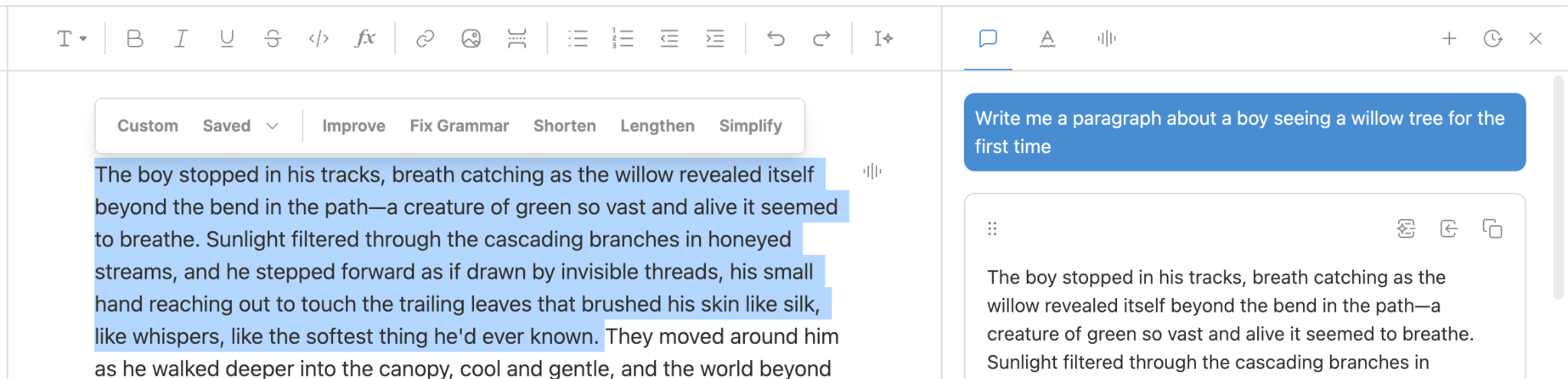
It makes the task intuitive: you highlight, then either tell the AI what you’d like done in chat or click one of a few preset functions that cover most needs. If you want it shorter, it proposes a shorter version, which you can then accept or reject:
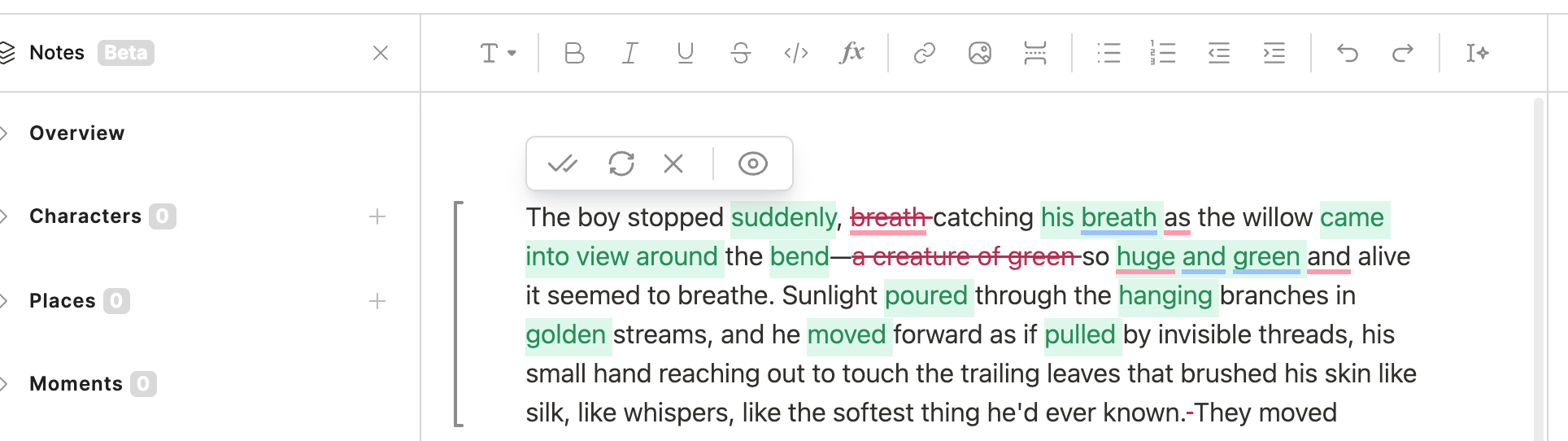
The experience of working in the environment struck us as uniquely smooth and fast. We were never really fully in writing mode or editing mode, but instead sliding between creating and refining smoothly as we went. It wasn’t that it was impossible to create the same level of text in ChatGPT - we can and have done so - but it was far, far easier and faster with Type’s tooling.
To reiterate, Type.ai’s paid plans allow for movement between different OpenAI, Anthropic, and Google models. That makes this decision less about capability and more about what environment helps the writer more. Usually, for writing, Type is going to win that battle; for generating an answer to almost any question, ChatGPT is stronger. For generating a manuscript, it’s Type all the way.
How Type.ai and ChatGPT were compared
As we get down to more granular comparisons of the two tools, it’s worth taking a moment to discuss how we assessed each tool against the other. The first component was our own experimentation - the general impressions we got using ChatGPT as compared to doing our work in Type.ai’s ecosystem.
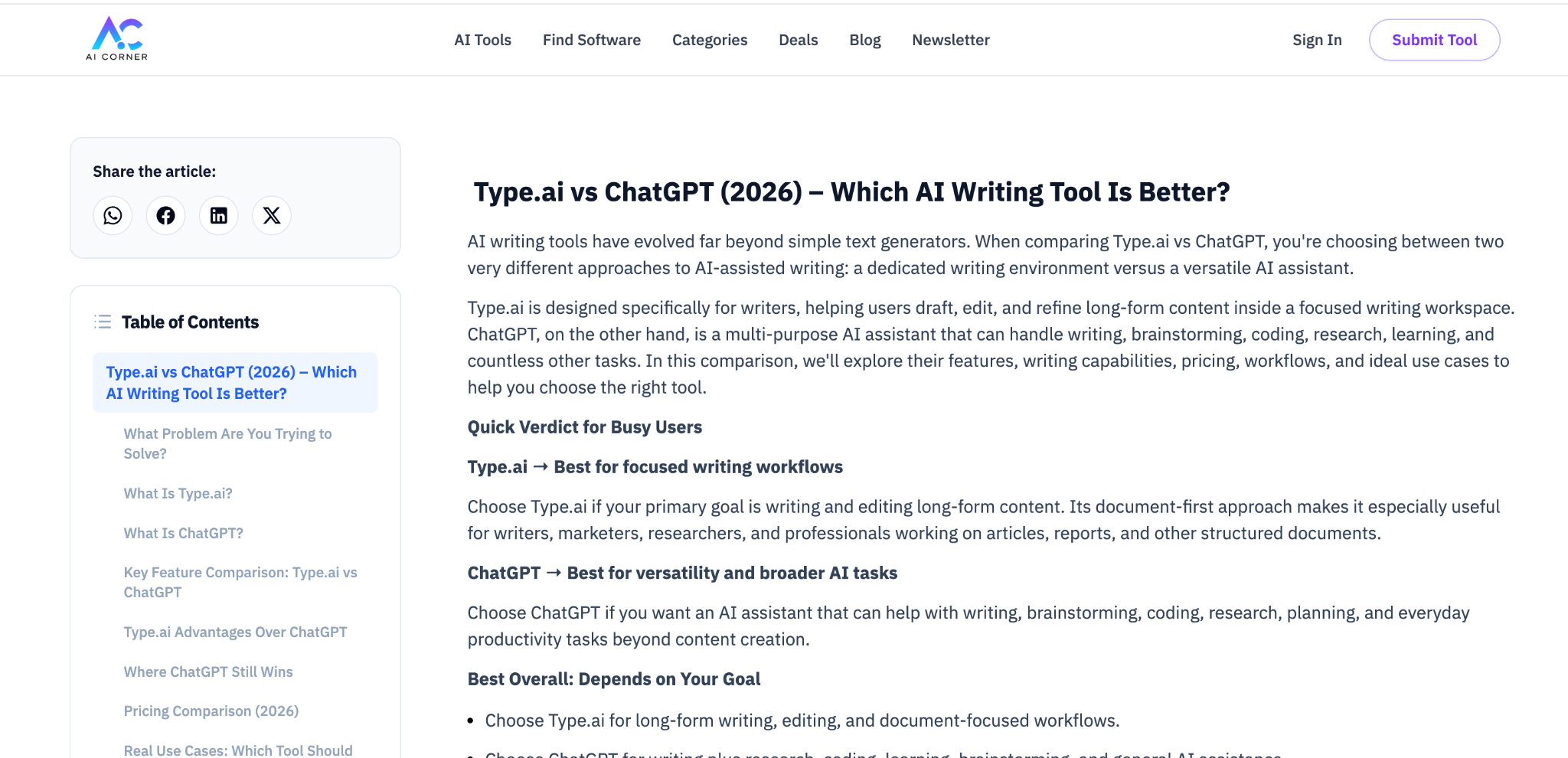
The second, and arguably more important method was by looking at how the same comparison was made by independent 3rd party evaluators, like AI Corner’s take here:
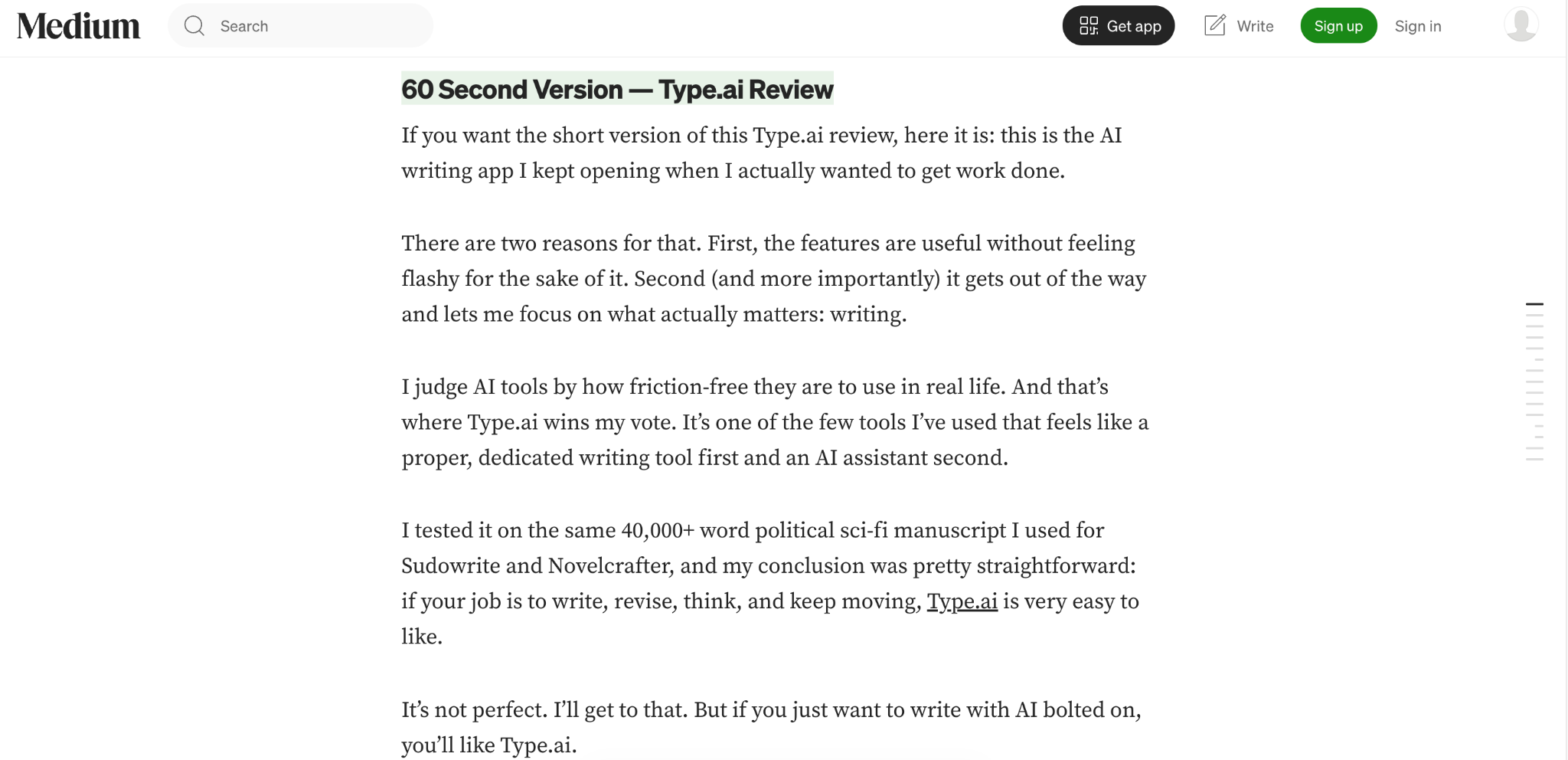
Or Ilam Padmanabhan’s Medium piece here:
From there, we looked at all sorts of metrics:
- Ease of getting started
- The quality of ideas and brainstorming
- How useful the first drafts ended up being
- Context handling, especially in long documents
- Control and preservation of style preferences
- Ease of editing and refining
- Continuity of tone, style, and voice across long documents
- Caution/accuracy with facts and research
- Organization and workflow
- Refinement processes between first-draft and final-delivery stages
All of our testing used Type.ai’s latest version as of 8/31/2026, set to use GPT at all times unless we explicitly note otherwise within a section. ChatGPT’s testing was performed on the same date within a pro subscription account set to medium-high thinking levels.
These comparisons are not directly equivalent, but we do our best to take every source and method used into consideration to create the most apples-to-apples comparison we can between two sometimes very different tools.
Padmanabhan’s report above describes him creating a 40000+ word manuscript in Type.ai, and he found he preferred it for much the same reasons we do; it’s a great environment to work in. At the same time, AI Corner’s coverage is heavy on appreciation for ChatGPT’s sheer breadth as a tool. None of these reports constitute scientific proof in one direction or another so much as they help inform your preference when choosing between a tool that does everything well and one that does a single thing exceptionally well indeed.
Starting from a blank page
From the very first steps, the experience of using ChatGPT and Type.ai feel profoundly different, despite the fact that they both use ChatGPT’s powerful capabilities to fuel what’s going on under the hood.
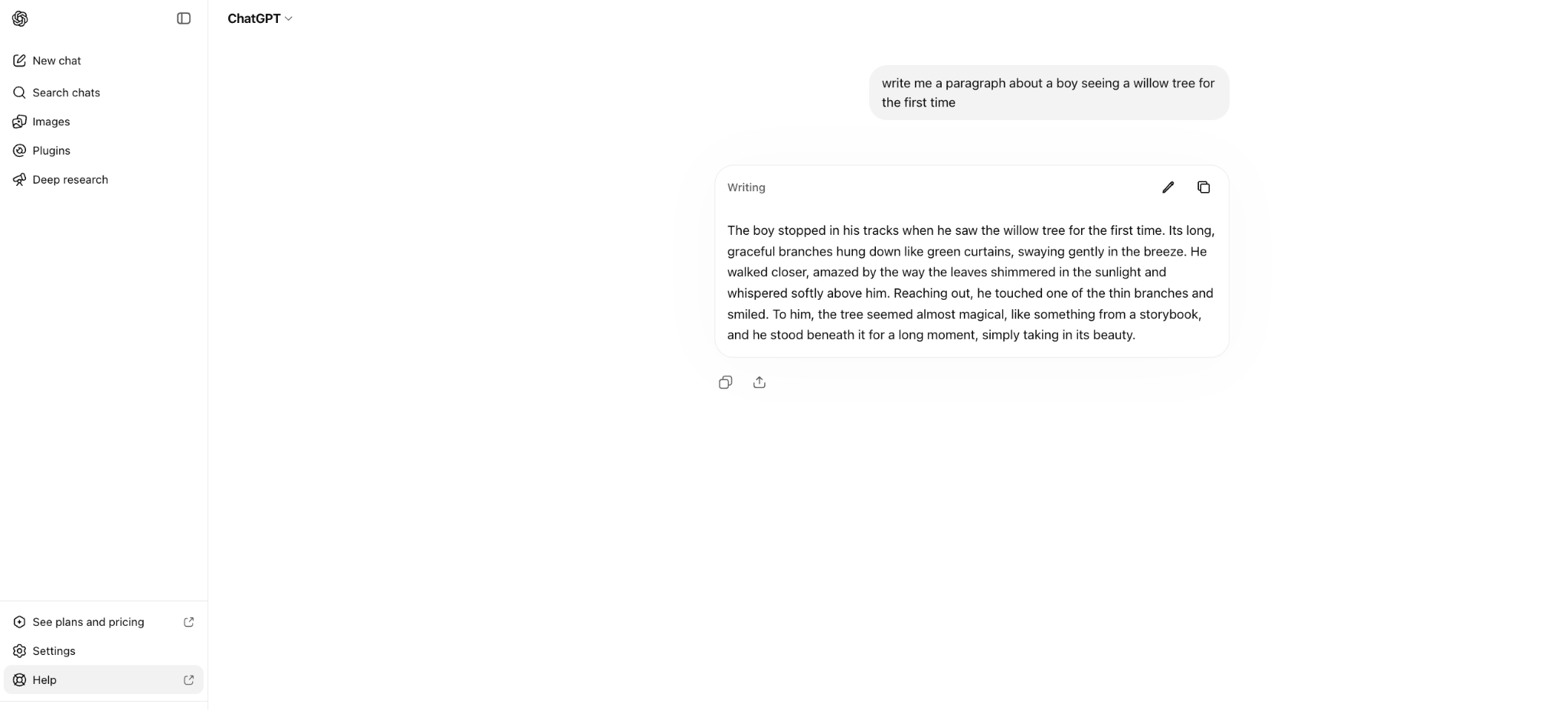
ChatGPT is first and foremost a conversation-first tool. Everything about it is built under the assumption that you will ask it a question and it will respond in ways that orbit around a conversational answer.
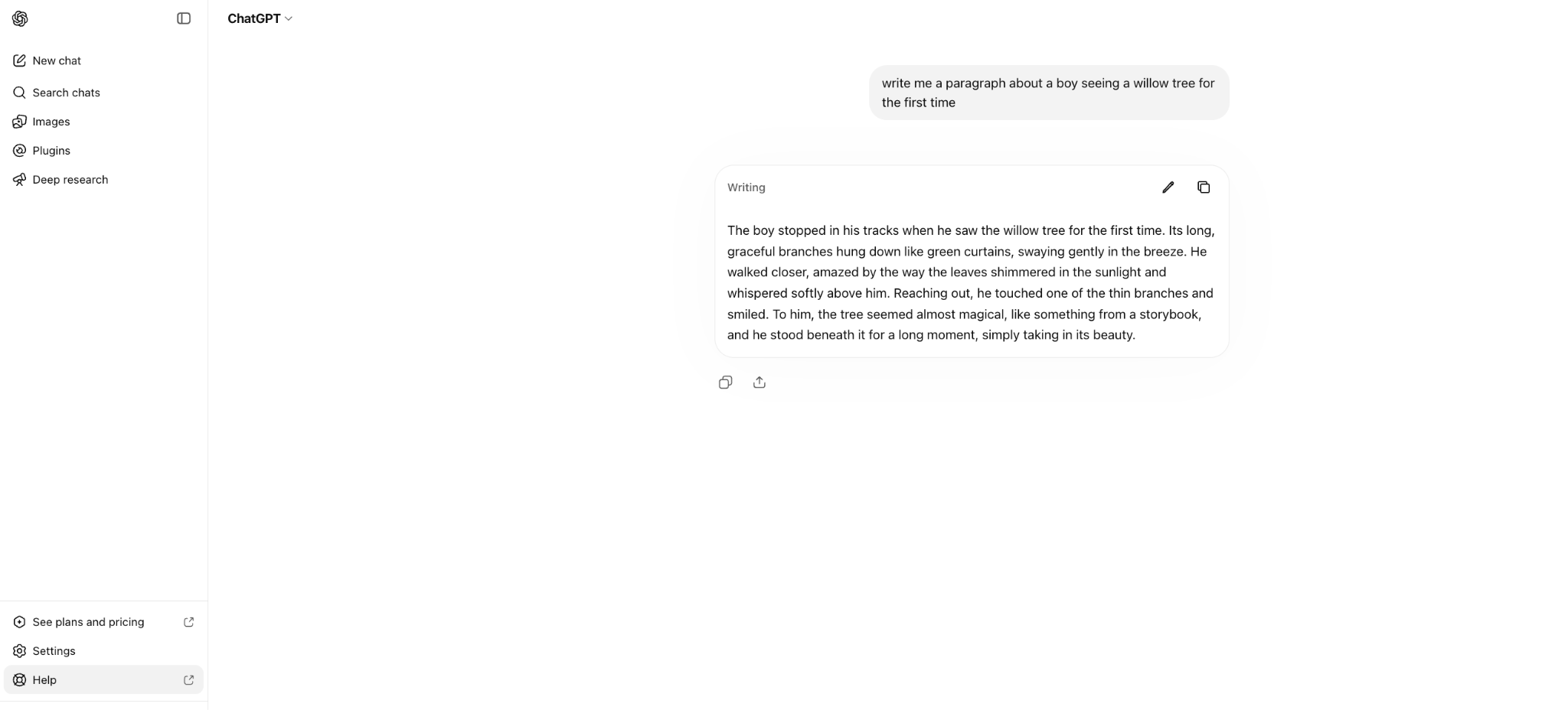
As in the screenshot above, this works just fine for small amounts of text. But things can get a little tricky as the conversation continues, or as you want to do more complex edits to work you’ve already done. Some parts of your conversation can get buried as you continue to work, and figuring out where all the little pieces of your writing have gone can take a while once you’ve been on the job for more than a few minutes.
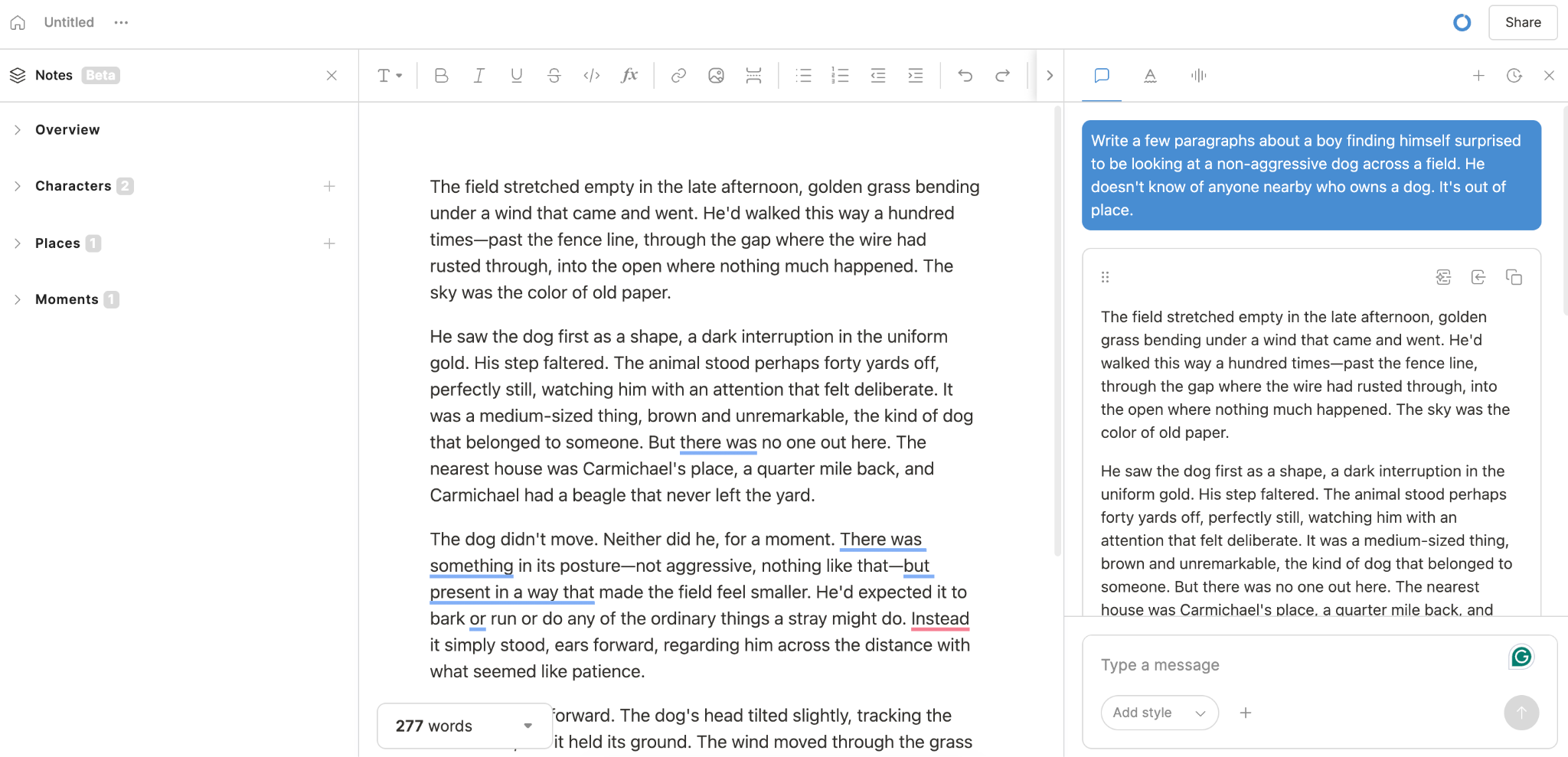
For comparison, the same work in Type.ai looks a lot like this:
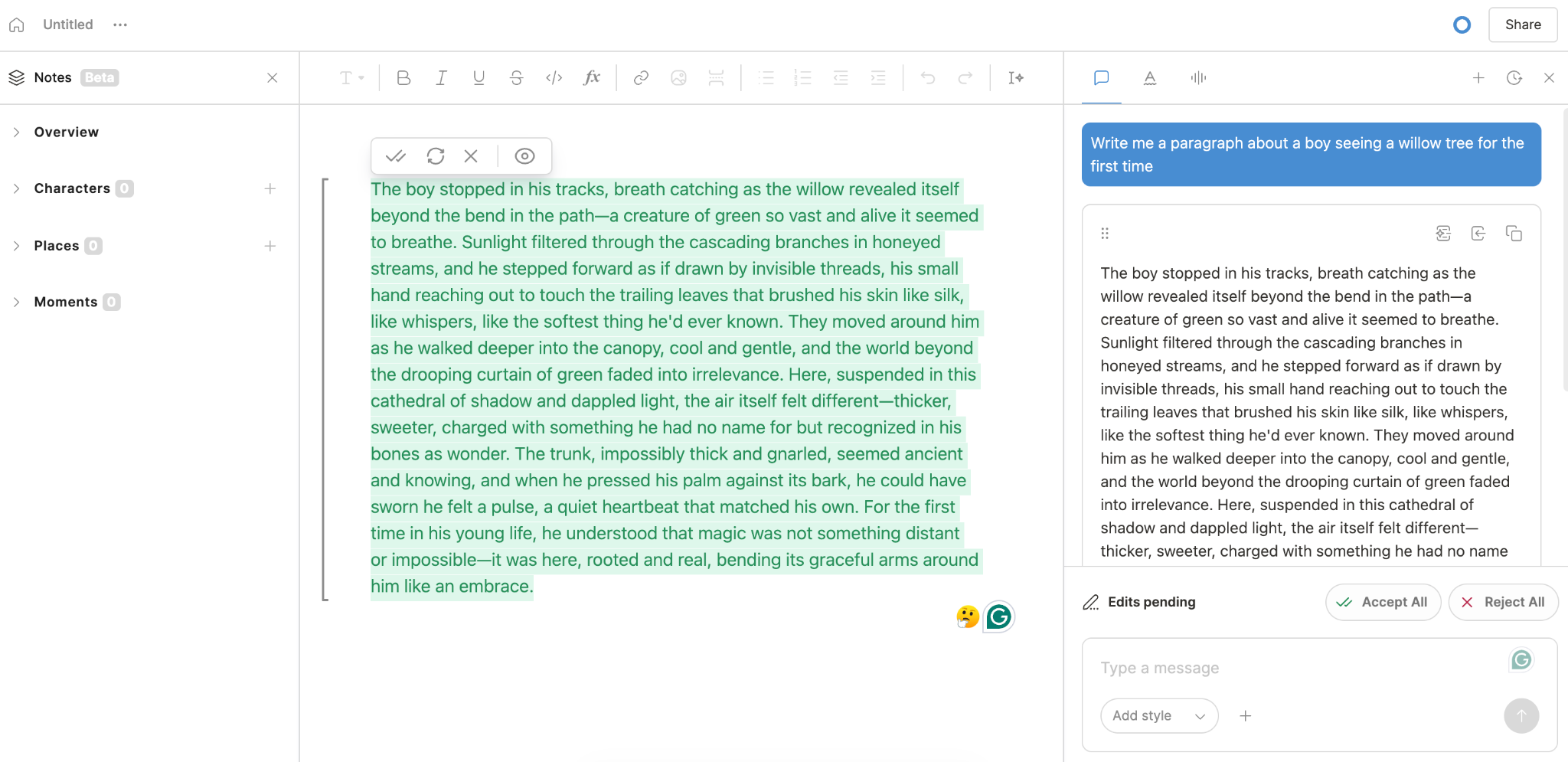
See the difference? It’s the same general level of quality, but the bot is now merely proposing a paragraph; it’s yours to accept or reject. Once you accept it, it’s part of a permanent, running version of your work that is always and forever center-of-screen, where you need it. Nothing gets lost, and finding a section you’ve already written and performing edits is trivially easy.
These differences compound as you try to do more and more with your text. For longer, more intensive work, ChatGPT solves some of the problems of its chatbot interface with a textbox functionality:
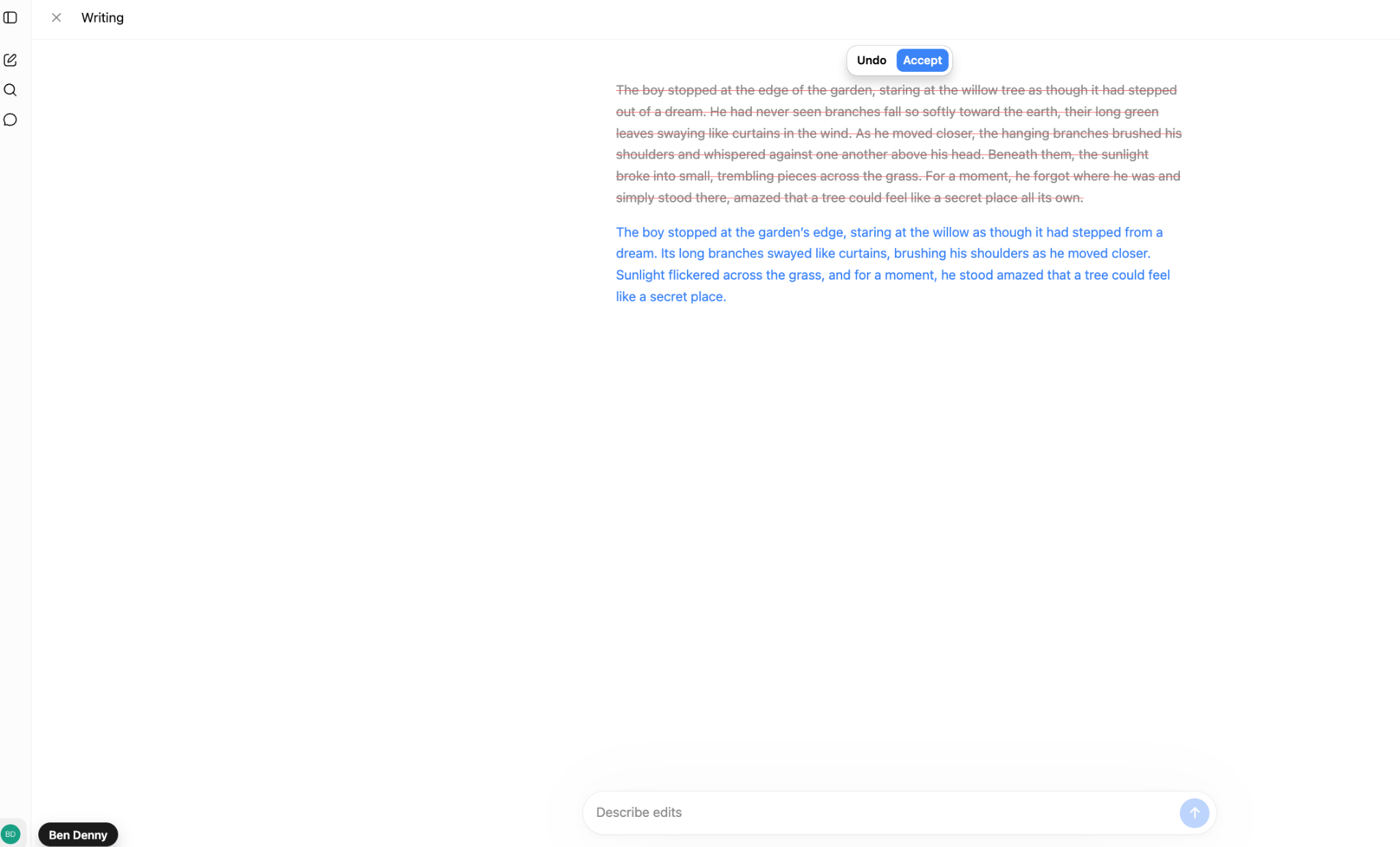
This solves some of the problems of interacting with a chatbot by making the editing process a simple call-and-response exchange: you ask for a change, and it proposes one. But we felt, and other reviewers seemed to agree, that the process was a little clunky and underbuilt; every single request had to be typed each time, and it seemed to produce a more variable, unpredictable result depending on how the request was phrased.
Worse was the lack of versatility within Chat’s specific writing environment. There is no access to notes or outlines as part of the built-in writing flow; while ChatGPT can certainly generate them, it has no method for keeping them accessible for reference during the writing process. We were reduced to creating notes with ChatGPT and storing them in a Google Docs file for context.
This meant that while ChatGPT might excel at any individual task - brainstorming, follow-up questions or tasks, outline creation, first-drafting, etc. - it was subpar at best at keeping all those capabilities in one cohesive piece; we found ourselves from the very beginning running back and forth to our toolbox when using ChatGPT, as opposed to the impression of sitting at a well-organized workbench Type.ai provided.
ChatGPT arguably has an edge when you want to talk out several different directions before committing to one. Type.ai shows every potential edit in the workspace, and biases towards working first and paring down to perfection later. For spitballing, ChatGPT is in our book a more pleasant experience.
Long-form writing and document context
Our and other reviewers' preference for Type.ai is partially related to how clean its interface is; it’s a fun, easy place to work. But when our test documents got longer, ChatGPT started working worse, compressing the context of the work too much and burning through tokens faster. ChatGPT put its own limitations like this:
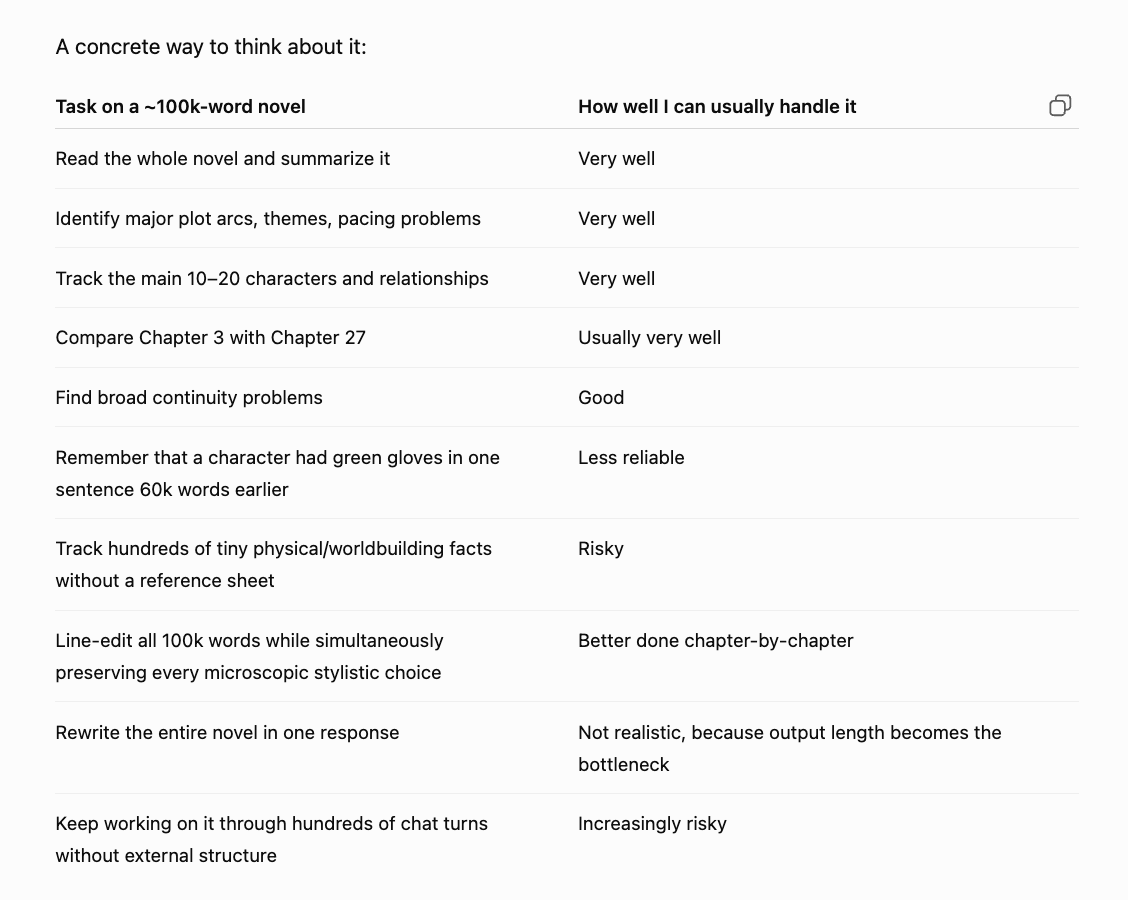
And we broadly found it was accurate in its own assessment. It can read short passages and compare them, and get a broad idea of what’s going on in the book. But it doesn’t “remember” the whole text at once, and has trouble managing keeping a whole text that length active. Some of this can be corrected by having a “story bible” that reminds it of important elements, but ChatGPT has no built-in functionality that makes this easy.
In Type.ai’s workspace, none of this is an issue. We tested a generation of 10,000 words of text under a simple prompt, as well as importing completed novels to space. The interface didn’t balk under 100k+ word counts (Type.ai handles up to 150k), and automatically found characters, places, and events to populate a context-correcting story bible.
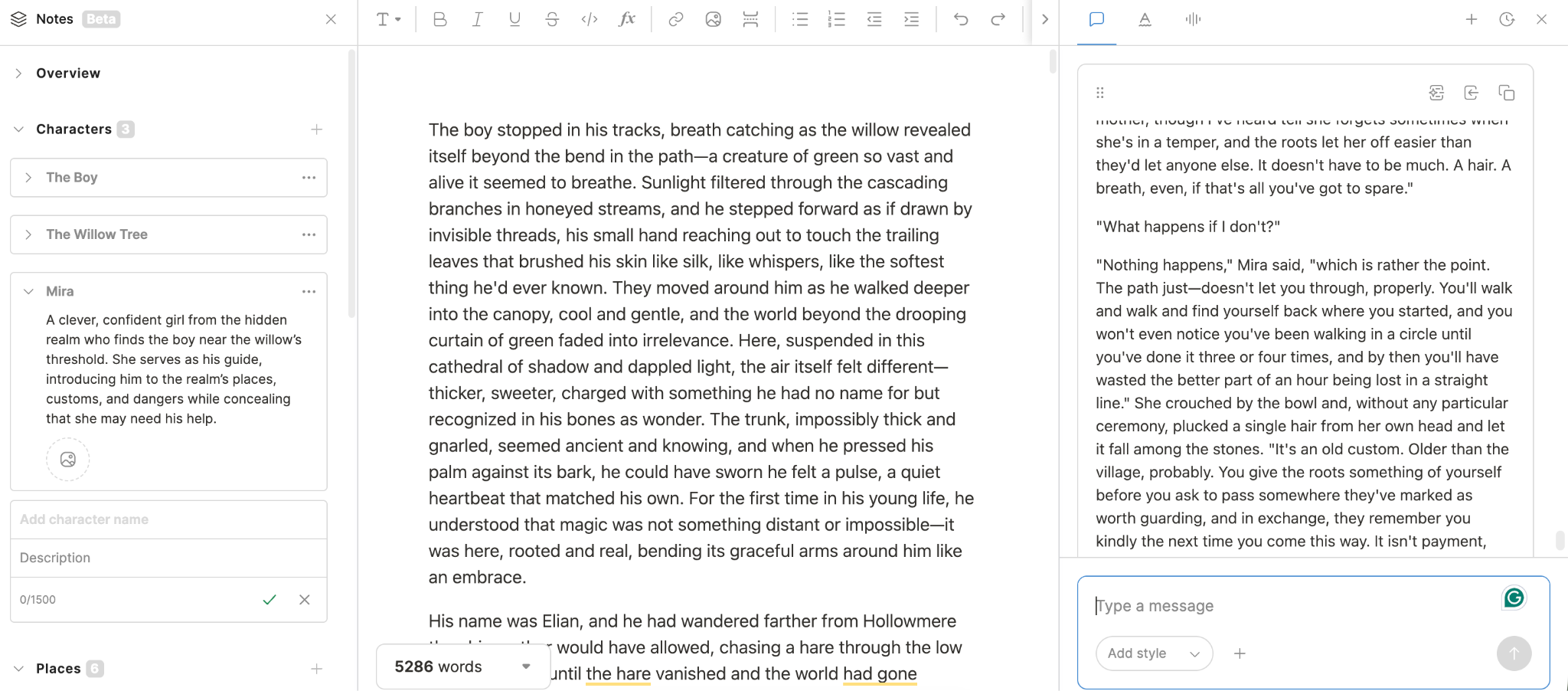
We found this capability to be widely effective across different kinds of work, too. We tested non-fiction books, novels, screenplay formats, and professional long-form work such as articles and blog posts. While some of the tooling within Type is specifically aimed at novels, we found it handled each different format admirably well, and that tools related to editing, shortening, or rewriting worked just as well across every format.
Part of why is wrapped up in the differences between a persistent document with AI-checkable resources and a long, conversational chat history. ChatGPT, which lacks the ability to create story bibles and notes in the same way Type.ai can, often compresses its context to a summary it refers to when conversations get long. This compression loses details. So if your character can’t swim, it might “forget” that fact in the process, leading to inconsistent work down the road. The same is true for notes you give it on style and voice; it often forgets specific instructions in favor of a general but cloudy memory of what you asked for in the past.
To get the same kind of performance out of ChatGPT, it’s usually necessary to make another document containing notes and rules (by, say, giving it access to another separate doc you’ve built for that purpose) and referring it back to those rules whenever it “forgets” what it’s doing. It’s also often the case that we needed to split up the document into separate chats, giving each new conversation the same context so that Chat was only trying to work on a few thousand words at once, rather than a whole novel.
If this sounds difficult, it is; it's a lot of work we spent trying to build the functionality Type.ai already provides instead of just writing and creating like we wanted to. Again, ChatGPT is perfectly capable of doing this on a small scale. On the large scale, our time was better spent writing with Type.ai than trying to reinvent the wheel with ChatGPT.
Note that even here, the simple descriptions fail to capture all the nuance. Type.ai’s document limit is 150k words, well over industry standards for 80-100k word first novels. That’s not quite the same as a 150k word context limit. There’s some fuzzy edges around how much detail even Type.ai is keeping front-of-mind at all times, but their note-taking and style-building functionalities are so strong that we found whatever limits there are grated much less harshly than ChatGPT’s, at least without quite a bit of effort spent on keeping it reminded of vital, user-provided context at all times.
Editing and rewriting
Editing and rewriting within ChatGPT is better than it once was. We want to be clear that the editing process is by no means bad anymore (it wasn’t great a year ago) and often borders on very good, depending on what you need. Broadly speaking, editing in ChatGPT happens in an ultra-minimalistic environment in which you make a verbal request for edits, and it provides a proposed response, as here:
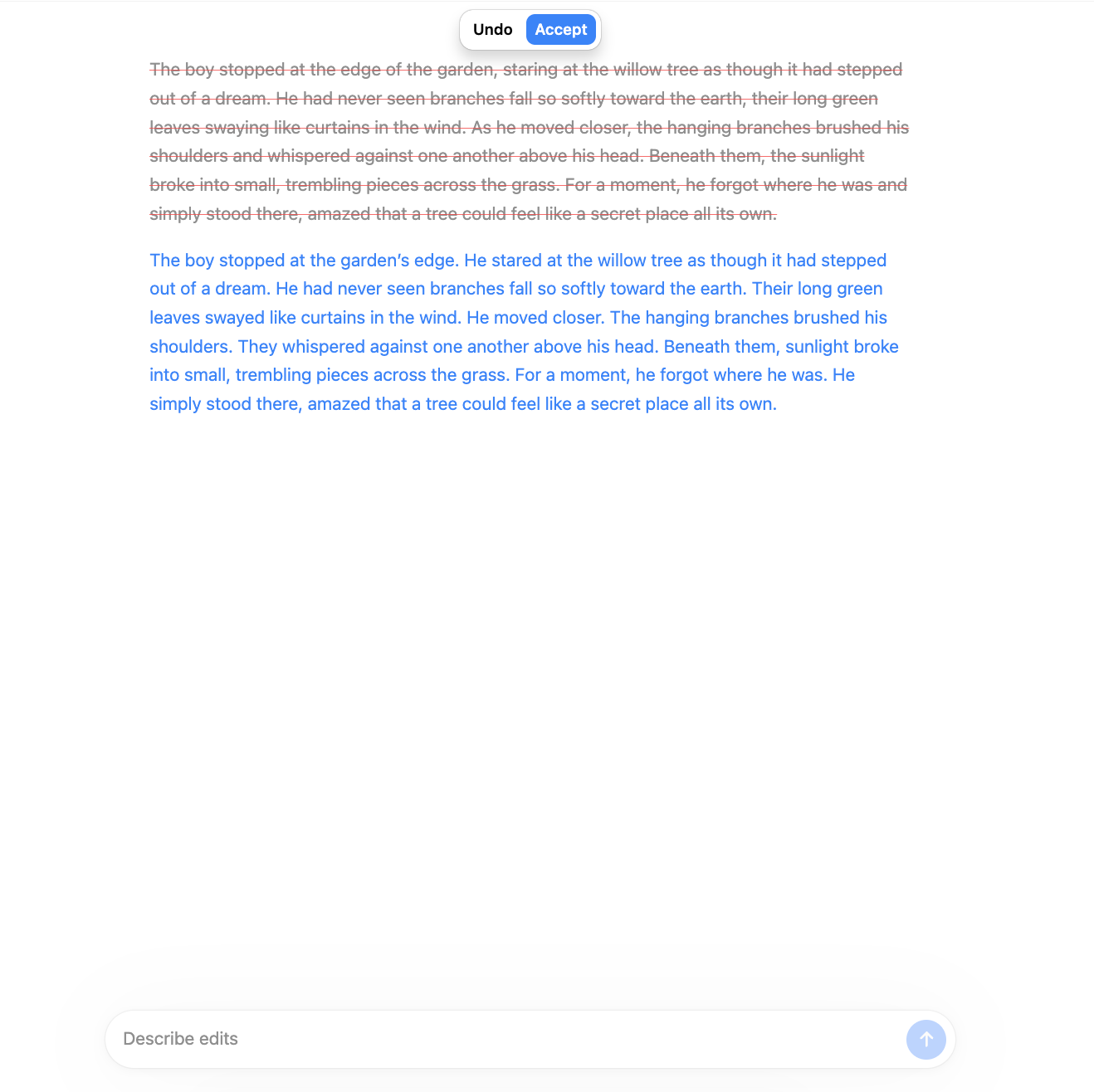
This is not the worst, and works; you can edit small blocks of text this way, no problem. But compare the same process within Type.ai, and you can see some of the differences:
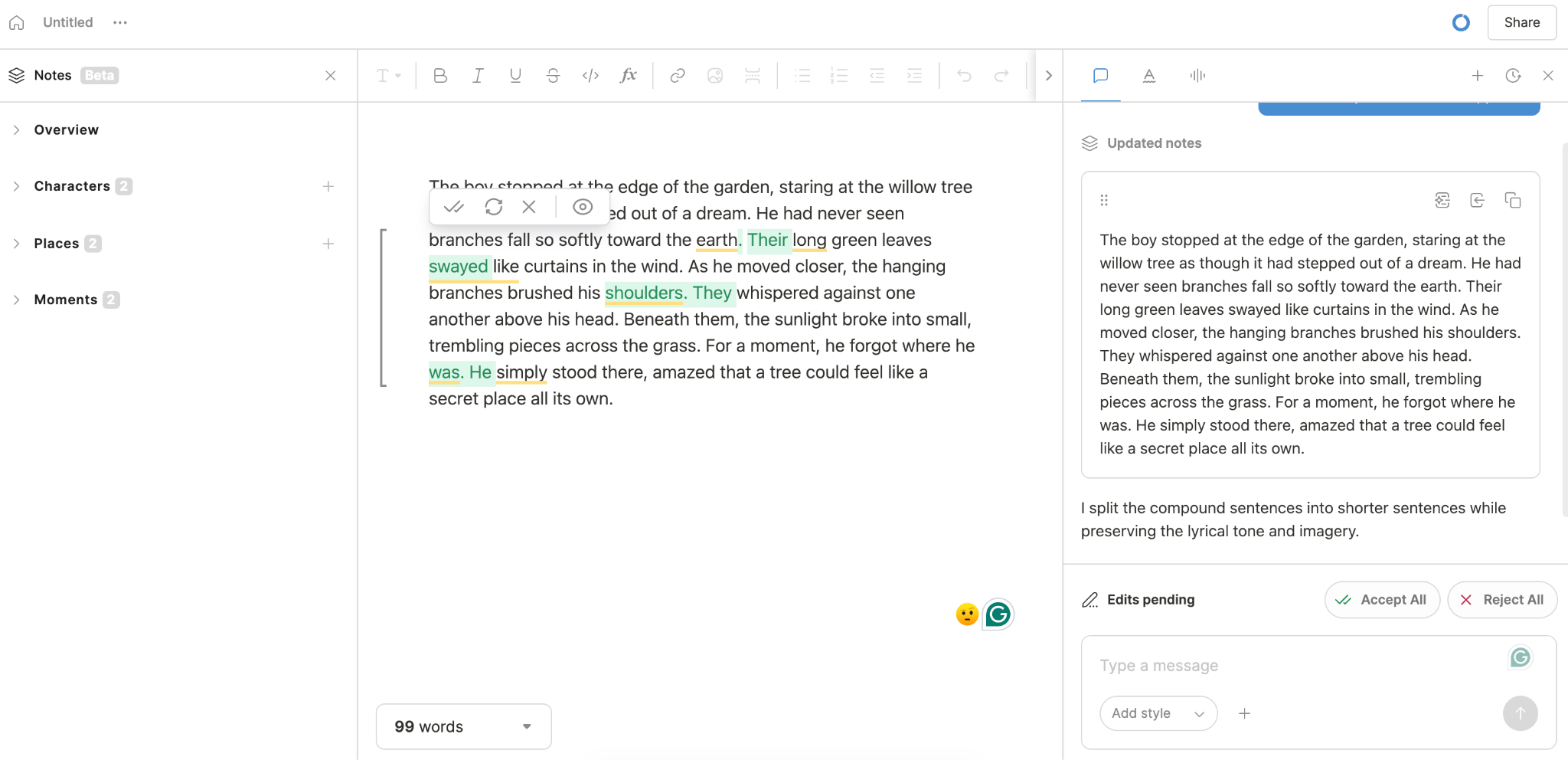
The same request to minimize compound sentences at once updated the story’s bible with the existing details available to it, highlighted the specific changes proposed, and created a persistent record of the request made within the chat window. If accepted, making more specific changes at the sentence level with a variety of tools could follow seamlessly.
ChatGPT’s editing works and is functional to a point. There are even writers who might prefer it. But Type.ai would please most writers best for the obvious reason that editing takes many forms and is often something that takes place during the greater writing process, not just as a part of the workflow that comes afterwards.
Type’s format is never in “editing mode”, yet always is; it’s also always in writing mode, and AI-generating mode. It is always ready to give developmental feedback on some or all of the work, or to retrieve a complete version history. Most impressively, it somehow does all of this without seeming “busy” as some tools do - your visual experience is always in a calm, clean environment that doesn’t distract from the work while making it obvious where to reach to grab each incremental tool you need. The in-app notes update based on your chat and document writing periodically, once again keeping you in the flow.
Since none of this functionality comes with any loss of capability (remember, Type is running the same ChatGPT model under the hood), it’s hard to imagine any situation where it’s outclassed by Chat’s current product unless you need an all-in-one tool for not just writing but all the other general things a top-notch chatbot can accomplish. Absent that, there’s no question which tool makes work easier.
It’s still useful to remember there’s more in common between the two methods than a first glance might tell you. Both ChatGPT and Type.ai can shorten a paragraph or change its tone. ChatGPT’s context windows used to be much smaller and much less suited for long works of fiction and non-fiction; they’ve improved quite a bit since then. Any claim that Type.ai can do something ChatGPT can’t, full stop, is suspect. But the way each program goes about doing these things is as different as can be; it’s in that difference that the choice lies.
Which tool produces better writing?
We want to be careful how we answer here, because the question of which tool does better work is more complex than it might at first appear.
ChatGPT has variable settings, from a token-stingy and fast “low” thinking mode all the way up to its spendy, high-intensity “Pro” level. Though pro is clearly better than the lowest-level settings for most things, every setting is still what you’d expect from a frontier model AI. They all do well.
Type.ai uses the same model at high settings, but also allows for using Claude if an author prefers how Claude attacks tasks related to text. Type provides the best models possible because that sets the best foundation for your work. But, as you’d guess, even the best models are only a single variable in the equation of eventual quality.
Another ingredient in the recipe is human revision; your editing, taste, and voice matter very much to what eventually comes out of either model. Your instructions on style and story matter. Human creativity being what it is, it’s possible to make better work with an inferior tool just because that tool happens to suit you and how you feel about writing better.
Other factors apply. How good is your source context? How hard is the topic to tackle in general, and what quality level is needed? If you provided a writing sample, how well does it represent your goals? All these affect the eventual output and its quality.
Taken together, these are the reasons there’s no definitive answer to “what’s best?” here; you are the biggest effect on your own writing, and neither Type.ai or ChatGPT can lay claim to that.
Writing style and preserving your voice
Both Type.ai and ChatGPT take style seriously. If you ask them to avoid certain styles or to lean into certain kinds of voice, they’ll do their best to please you, often with very good results.
As with other categories on the list, the difference lies in how they go about this. ChatGPT holds your style instructions in its context window, a non-permanent part of every conversation that gets changed, compacted, and altered as a conversation grows longer. It can be provided with files that describe what you want, and don’t live in its context window, but how much it refers to those is a matter that varies with every conversation you have.
Type.ai’s design is such that your provided context lives in the app, generated from the work and your instructions as you go. With every request you make, that context is checked as part of the normal, trained workflow. It’s consistent and, at least in many aspects, automatic.
That’s not to say that ChatGPT can’t be made to respect your wishes on style and voice consistently; it can. But without the tooling to make that easy, it takes a certain amount of effort to verify that actually happens.
It’s also important to note that while both Type.ai and ChatGPT are good at imitating your voice and style, neither is perfect. The amount your voice shines through on either is broadly a function of how much time you are willing to spend injecting yourself into the text through edits and revisions. That’s not a failing of either product; no AI tool has this down pat yet.
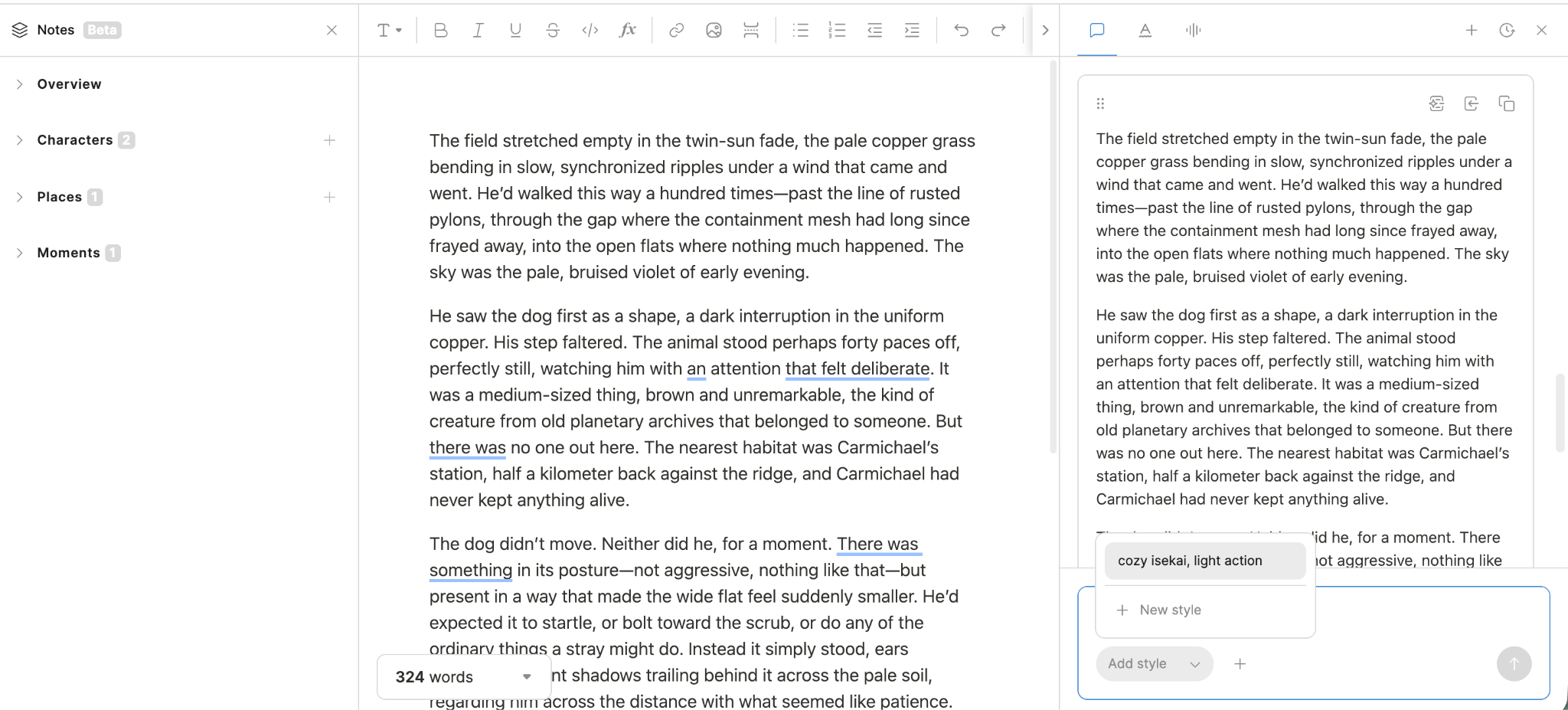
Giving style instructions in Type.ai is still something that takes a bit of effort, even as streamlined as the process is. We’ve found the easiest way to tackle that is by building up your style over time, entry by entry:
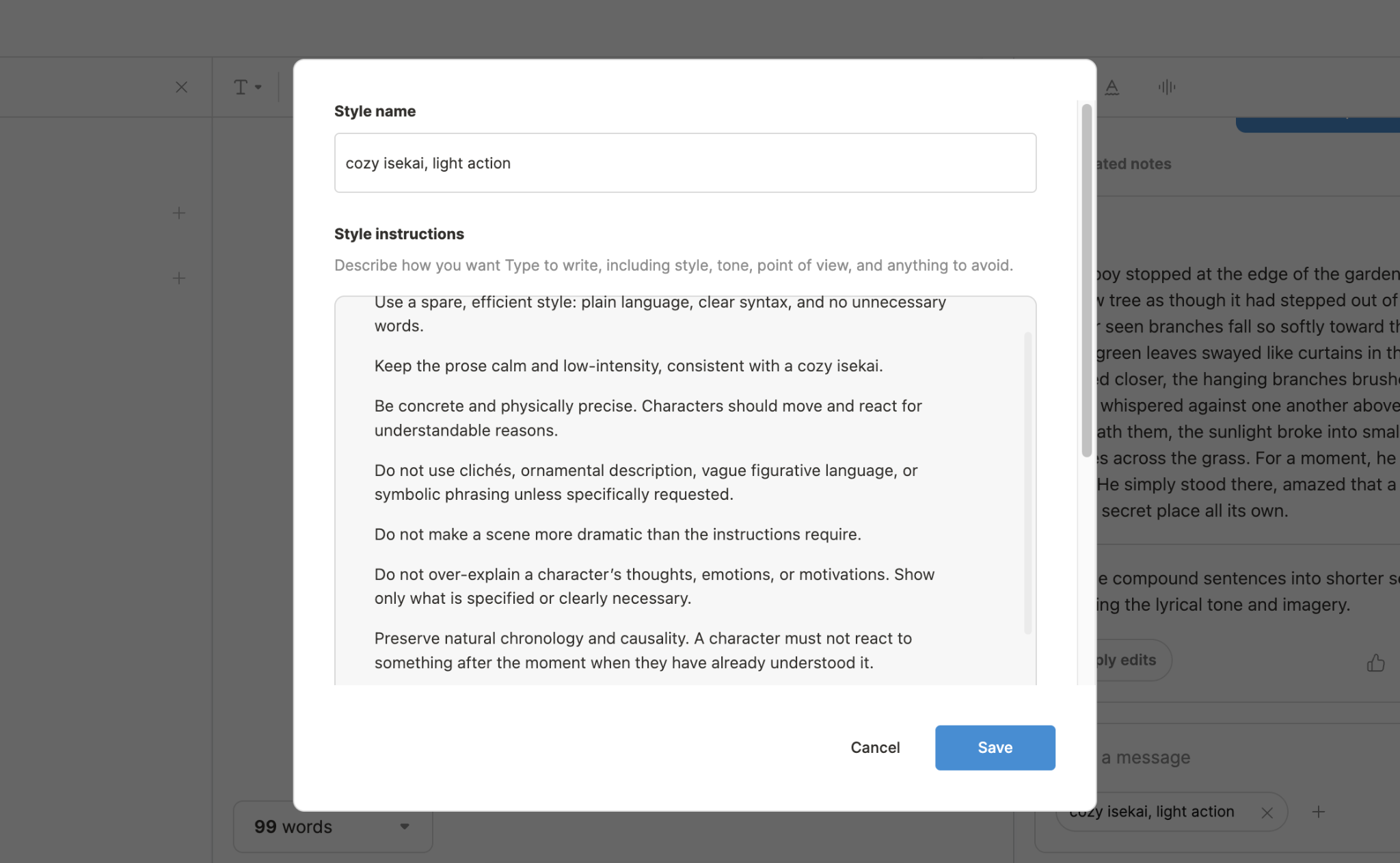
Both ChatGPT and Type’s AI assistant are good at helping you winnow out these types of adjustments over time, by assessing your work-to-date and deciding what parts of it are worth emphasizing. They are even better with a good writing sample to guide them, and asking either to analyze and break out lessons from a great snippet of your previous work helps shortcut around the hardest work during project setup.
Research, academic writing and factual accuracy
ChatGPT is a much stronger tool for research than Type.ai. This isn’t to say Type is bad at it, but ChatGPT and other frontier models are absolute monsters at finding the correct answers to all sorts of questions, even when that means poring through sources and obscure webpages until they are certain they have it right. It handles sourcing, references and quotations, and factual verification of information very well, all while having decent controls to help you maintain academic integrity throughout your work.
Type.ai is a better tool for writing in general, but for some users that means that ChatGPT might be more convenient for certain kinds of academic writing, especially when the length of the work is on the shorter side. Other writers like to split the work between the two programs, using ChatGPT for research and accurate answers to questions before turning to Type.ai to write, edit, and refine a finished piece.
As a word to the wise, it’s important to understand that neither tool should be treated as the end-all-be-all of factual authority on academic matters. Nothing on the market today can replace human judgement and expertise entirely, especially on complex, scientific or academic subjects.
Where ChatGPT is better
ChatGPT can do just about anything. It’s an excellent researcher and a great brainstorming partner. It can create a paragraph of text as well as it can draw you a picture or solve a math problem, which is to say it can do all of those things at an extremely high level of skill. That’s the product’s strength: it’s simply one of the most versatile, powerful tools ever made for all manner of work.
It’s so powerful, in fact, that many of Type.ai’s features are to some extent or another duplicatable in the chat interface with work and know-how. ChatGPT can handle persistent context if it’s provided a document and reminded it exists from time to time. It can do very good document analysis to help you find places to improve the work, and can even assist with edits after that.
Its main downfall compared to Type.ai is that it’s not inherently designed to do these things. What Type.ai does automatically, ChatGPT has to be cajoled into doing. That means it’s no less powerful, but it often takes much more effort to get the same amount of work done. For some writers, this means a worse flow. That in turn means more work and less words per unit of effort.
None of that means ChatGPT isn’t marvellous; it is. It just faces the same realistic barriers that any non-specialized tool does. It’s great for coding and analysis, emails, summaries of work, social media posts, and any quick rewrites or first drafts that don’t need intensive babysitting or author involvement. The trade-off is that for general tasks not having to do with writing, it beats the pants of Type.ai (and almost everything else in existence, for that matter).
Where Type.ai is better
Type.ai is a powerful tool, especially when users need to work on a large document over a long period of time. The most compelling reason why is that Type.ai’s workflow centers itself around your document. When you edit, the tools interact with your work in front of you, allowing you to accept or reject changes with the push of a button. Generation of new text via the AI assistant is the same; you see what it proposes to add, then add it or decide not to with your eyes on the work you’ve already done. Nothing happens without your approval, and nothing takes you away from your writing flow. Generated text can be smoothly edited, human-written text can be assessed by an AI critic, and notes can be generated from the work all on one page, without ever creating any distance between a writer and the act of writing.
Type’s model choices also let you choose between Anthropic, OpenAI, and Google models on the fly, which lets power users customize their writing process around the things each model does best. Each model is fed from the same persistent context, built inside the project itself as you go. This keeps your work on track and as much in your style as possible at all times.
Some but not all of these features are possible in ChatGPT, but even when it can handle part of them (say, using a context document as a reference) it takes both more up-front effort and continued effort to ensure it stays consistent to your goals.
So when, for instance, you want in-line editing in a clean, clear, and understandable environment, you want Type.ai. When you want to manage revisions in a highly visual, understandable way, it’s the same thing. ChatGPT is powerful, but it can’t keep up with writer- and document-first design.
Type.ai vs ChatGPT pricing
Both Type.ai and ChatGPT offer free tiers that might be adequate for some writers’ needs. Beyond that point, ChatGPT and Type are both very reasonably priced considering all they do, and the choice of which (or of both) has a lot to do with what you, as a writer, need.
So when do you pay for one or the other, or both? The answer depends on your specific situation. If you need a general assistant tool for all of your life’s work, ChatGPT is the better choice to start with; it simply handles almost everything. If ChatGPT’s free version covers your needs in that respect but doesn’t accelerate your writing like you thought it would, it’s probably time to try Type.ai. If you need both tools and need them a lot, you might end up with two subscriptions.
The answer varies person by person, really. Which is why it’s fortunate that both products are inexpensive compared to what they do, and both offer various tiers that ensure you never pay for more than you want.
Which tool fits your writing process?
This table that follows is a guideline, not rules carved in stone. We’ve done our best to support every aspect of why we think Type.ai is better for the work of writing, and in that process we’ve discovered many places that ChatGPT is just the better tool. Take a look, decide which applies best to you, and you’ll have a good jumping-off point for which product to try first.
Final verdict: Type.ai or ChatGPT for writing?
The Final Verdict: Type.ai is better for the task of long-form writing, in any format.
ChatGPT is a powerful tool, which is why Type.ai leverages that power for its document-first writing environment. It is also a generalized tool, lacking specific, specialized tools writers need and want. For short work like small briefs, writing emails, or compact bits of story, it’s excellent. On longer work, it falters. Not every writer needs a full dedicated writing app, of course, and for shorter or less involved work ChatGPT is just fine. But for longer, more involved jobs, Type.ai makes things easier, faster, and just more pleasant, which is enough to tip the scales in its favor.
Where an efficient, organized writing environment is desired, almost any author is better served by Type.ai’s clean, document-first format than ChatGPT’s more general-use tooling. If the document itself is the work, use Type.ai; if research, brainstorming, or AI tasks unrelated to writing are the goal, ChatGPT works just fine.
Some writers might even choose both, using ChatGPT as a partner for brainstorming and idea development in a non-persistent environment before moving to Type.ai for long-form drafting, refining, and editing. But, generally speaking, there’s a clear winner here. That winner is Type.ai.
Frequently asked questions
1. Is Type.ai better than ChatGPT for writing?
Both programs generate text about as well as each other, given the right instructions. Where Type.ai beats ChatGPT is in the design of its interface, which makes developing those instructions in a persistent, dependable way easier and helps editing and revision happen more efficiently.
2. What is the main difference between Type.ai and ChatGPT?
ChatGPT is just what its name implies - a chat-based interface. That makes it easy and convenient for thousands of different tasks, but it also makes it unspecialized. Type.ai allows you to get all the power ChatGPT offers while putting it to work in a much more writer-friendly environment, with tools and convenience that ChatGPT just can’t offer at this time.
3. Is Type.ai better for writing a book?
Broadly speaking, yes. Type.ai allows for 150,000-word document lengths, AI-assisted note-taking that lives in the project and informs your LLM generation, and other features that make the long, hard job of writing a novel much easier to organize and complete. ChatGPT is still a great tool for many aspects of writing, but not as specialized for the job.
4. Can Type.ai handle an entire novel?
Yes. Type.ai accepts individual documents up to 150,000 words long, and has tools that make keeping track of characters, locations, plot points, and your writing style easy.
5. Does Type.ai use ChatGPT?
Type.ai’s paid plans allow you to choose between OpenAI, Anthropic, and Google models. Different writers will use one or the other for different reasons, but all the power of ChatGPT’s writing abilities is available within Type’s interface.
6. Can Type.ai use Claude and Gemini models?
Yes. Type.ai’s paid plans allow you to choose between Anthropic, OpenAI, and Google premium models.
7. Is Type.ai free?
Type.ai has a free limited plan that is enough for some writers’ needs. For anyone who needs more usage than the free plan provides, Type.ai’s paid plans are some of the most affordable on the market.
8. How much does Type.ai cost?
Type.ai offers a free plan and paid Basic, Pro, and Max tiers. As of 8/31/2026, they were priced at $12, $24, and $96 a month, respectively (or $8, $16, and $64 when paid annually).
9. Which tool is better for long-form writing?
Type.ai is the generally better tool for long-form writing, and that gets truer the longer the work is. With huge 150k word document limits, Type.ai allows you to start and finish even long works in the same place, building project-level context as you go that stays with you from the first word right until publish.
10. Which tool is better for editing?
Type.ai’s specifically designed editing tools and document-first workflow make it the better choice for most writers. ChatGPT’s editing interface is simple and usable, though, and getting better every day.
11. Can Type.ai preserve my writing style?
Type.ai has several tools meant to help you define your style for AI generation and editing. The tools work well, but no tool on the market today can perfectly mimic a human’s written voice 100% of the time. A combination of AI help and human editing is best to keep your style consistent.
12. Is ChatGPT better for research and brainstorming?
Yes, usually. Most people brainstorm best in a conversation, which ChatGPT is built to do and does as well as any option on the market. It’s also arguably the most powerful tool available for general research. Type.ai is best for every step after that, when your prep work needs to become written words on the page.
13. Can either tool replace a human editor?
It depends. Human editors and AI tools make different choices. Some people find that AI tools edit to their needs, or even beyond. Others prefer a human touch even if they use AI editing for the initial cleanup of their stories and articles.
14. Does Type.ai train AI models on my documents?
No. Type.ai does not train models on your documents or writing.
15. Do I need Type.ai if I already use ChatGPT?
That depends on your needs. Some people find that ChatGPT is perfectly adequate for the kind and amount of writing they do. Others find they have reached a point where a specialized tool that makes the process even easier is justified. Whether or not you need Type.ai is a choice you’ll make based on how much writing you do, and how easy you want the process to be.
16. Can I use Type.ai and ChatGPT together?
You can! Many users use ChatGPT for brainstorming and research and Type.ai for the writing process. The two products do not integrate with each other, so some manual effort is needed to move work from one app to the next.
17. Is Type.ai a dedicated writing tool or a general AI assistant?
It’s a dedicated writing tool. Most AI tools are built around the idea of being able to do anything, and that’s part of why they are accessed through the most generally useful format available - chatting. This works great, and it means that you can ask an AI to edit a photo just as easily as you can have it help you with your taxes.
The problem with this is that being good at everything via a general-use interface means that chat tools are not specialized in anything. Type.ai is the opposite case. It’s very specialized to the task of writing, and it’s much better at helping users create long-form documents as a result. It’s worse at everything else; if you need your taxes done or a picture generated, you are better off using a chat-based product.
18. How is Type.ai different from most AI writing tools?
Most Ai writing tools focus on generating, not writing. They bolt AI capabilities onto a simple text editor, figure out how to feed the AI context, and call it a day. Type.ai goes much further. Type’s minimalist interface assumes you are part of the process and keeps the entire document in view, allowing you to do inline-editing with accept/reject controls as you write without losing control of your own voice.
Other features like automatic notes give the AI more context as your project gets longer. Since paid tiers give you access to premium OpenAI, Anthropic and Google models, you don’t lose any power or quality in the deal. It’s a best-of-all-worlds tool.
19. Is Type.ai good for creative writing?
Absolutely. Not only does Type help with worldbuilding through automatically updating notes about characters, scenes, locations, and other aspects of your setting, it also allows for real-time , inline editing and text generation without ever taking your focus away from the document. Combining all that massive 150k word document size capabilities, Creative writing is Type.ai’s wheelhouse.
20. Is ChatGPT the wrong tool for writing a book?
It’s not a wrong tool; plenty of people use it for just that purpose, with decent results. The problem is that a chat interface is a very general tool to use for a very specific purpose like writing a novel. Type.ai’s interface combines all the power of premium OpenAI models with specific tooling that helps you get the most out of them, which helps most writers much more than a general chat interface could.
21. Which is faster: Type.ai or ChatGPT?
Generating text in either happens at about the same speed, since both tools are running the same underlying models. But the speed over a full project differs much more. Type.ai has specialized tooling that harnesses AI power to editing and writing tasks much more efficiently. Since the document is always front-and-center, persistent, and hooked up to every tool you need, this makes for much more speed over a novel-length project.
22. Does Type.ai charge extra API costs?
No. Type.ai's paid plans include model access from OpenAI, Anthropic, and Google within each plan's usage credits. It’s not unlimited uses (higher-tier plans come with more credits), but Type’s token limits are very generous at every price point, making it easy to get what you need at the lowest possible cost.
23. Can Type.ai keep my own voice, or will everything sound like AI?
Type.ai generates text based on style notes you build and provide; every sentence the AI generates for you takes those notes into consideration. No AI tool is perfect at this, yet, so the amount you edit and contribute has a definite effect on how much of your voice you keep through that process.
24. Does Type.ai or ChatGPT include plagiarism checks?
Neither product is a dedicated plagiarism checker. If you are writing something where plagiarism avoidance is all-important, run your work through a dedicated plagiarism detection tool before publishing it.
25. What advanced features does Type.ai have that ChatGPT lacks for writers?
Type.ai allows for 150k document length limits, which goes far beyond the document lengths chat tools are generally comfortable with. It keeps long documents focused in the center of the screen and arranges generation, review, editing and note-keeping tools around it in conveniently oriented locations to help keep your work efficient and to eliminated copy-paste tasks and mistakes chat tools tend to make.
26. In the ChatGPT vs Type.ai debate, what should I focus on?
Focus on your workflow. Both tools use the same powerful models to generate text, so what matters is how you want to work. For most tasks related to writing, Type.ai’s specifically designed writing environment is just more convenient. It’s faster, deals with longer documents better, and allows for better focus and flow than chat tools do in most cases.